One Week Off. A Relaunch. And a New Sense of Productivity.
MitKids.de has been around for more than ten years. For a long time, I wondered whether that alone was still a good enough reason to keep the project alive.
My wife and I originally started the platform as a side project, to help families find ideas for active leisure time with children. Over the years, the site consistently attracted a lot of visitors. And more importantly: a lot of positive feedback.
At the same time, the landscape changed significantly. New platforms emerged. And with AI, there are now completely different ways to search for leisure activities.
At some point, a question came up that I had postponed for quite a while:
Do we let the project slowly fade out - or do we give it a conscious restart?
Why this relaunch wasn’t a classic redesign
I didn’t go into this project believing that AI would replace developers. I still don’t.
But I do see very clearly how much the way we work is changing right now. And how many possibilities open up when AI is not treated as a toy, but as a fixed part of everyday work.
For me, the relaunch of MitKids.de was therefore less a redesign and more a test run. What really interested me was this question:
How would I start a project like this today, if I deliberately used AI and coding agents from day one?
After the project, I was honestly surprised by how well this worked. Working on it almost felt like I had cloned myself - and multiplied that version.
I didn’t think less. But I got a lot more done - in much less time. The entire relaunch was completed in my spare time within a single week. And with a level of quality that wouldn’t have been realistic for me before.
Overview: how I approached the project
I roughly divided the project into six steps:
- Planning and concept development
- Design and prototyping
- Transition to the target architecture
- Backend setup and integration
- Migration of existing data
- Iterative development of features and quality
These steps are familiar from many software projects. What was new for me was how I went through them this time.
1. Planning: concepts as conversations, not documents
At the beginning, there was neither design nor code. Instead, I worked on the conceptual foundation - content-related and technical - together with an ChatGPT.
It wasn’t about getting fast answers. What helped much more was bringing in different perspectives and discussing questions that actually mattered to me:
- Where does MitKids stand today - after ten years of operation?
- Which content is really being used?
- What still differentiates the platform from others?
- And what role can directory-style websites even play in a world with AI?
The concepts were refined, rewritten, and deliberately challenged again and again. Next to ChatGPT, I also reviewed some concepts with Gemini and Claude to get additional perspectives. In retrospect, this planning phase was one of the biggest levers in the entire project. It paid off - with fewer follow-up questions, fewer corrections, fewer detours.
2. Design and prototypes: thinking in variations
Only once the concept felt stable did I move on to design. The goal wasn’t a final layout, but rather a sense of possible directions.
I tried various design and prototyping tools - including Magic Patterns, Base44, Lovable, Replit and v0.
In the end, I chose Magic Patterns because it fit this project best. But the real difference wasn’t the tool itself. It was the interaction. I took screenshots of the designs back into the chat step by step, together with the full conceptual context, and reviewed them there:
- Does this fit the target audience?
- Does it support the core idea?
- Is it clear - or just pretty?
What really mattered were the short feedback loops. An idea in my head, a draft on the screen, and an immediate review with full context.
3. From prototype to target architecture
Before writing any code, I defined a technical target picture: architecture, performance requirements, basic SEO considerations.
The first step was deliberately a pure frontend application. Static data. Local storage. No backend logic.
For implementation, I worked with coding agents. In previous projects, I had used Claude Code. For this project, I tested Codex.
The most important factor was context.
I maintained an AGENTS.md file that documented basic rules, conventions, and project goals. In addition, the agent had access to the concepts and design prototypes.
In parallel, I had a Storybook set up. Not primarily as documentation, but as a tool to properly think through the design system.
4. Backend setup and integration
Once the frontend was stable, I moved on to the backend. I deliberately chose Supabase. It covers many fundamental topics cleanly, which allowed me to build a working backend very quickly - including database, authentication, and role models.
Based on the existing frontend, the data structure was defined. The technical concept was extended iteratively and reviewed again with the help of ChatGPT.
Static data was gradually replaced with dynamic data from Supabase.
What helped a lot was that the AI already knew the Supabase documentation and common best practices. As a result, backend work felt less like searching and more like building together.
5. Migrating existing data
A large part of the project was migrating existing content.
I exported the old database structure as SQL. The content itself as CSV files.
Based on this, the coding agent created migration scripts that:
- transferred existing data
- populated new fields in meaningful ways
- resolved inconsistencies
The migration was iterative:
First import. Test. Adjust the script. Next import.
Until the data actually felt right.
What impressed me was how quickly the old database structure and its contents were understood. I could build migration scripts that knew my Supabase structure, analyzed existing data, and extended it in targeted ways - and then check the result on the live site shortly after.
6. Iteratively developing features
After the migration, the real fine-tuning began.
I developed features iteratively with Codex. It helped a lot to turn my ideas - together with the existing concepts - into new prompts for Codex using ChatGPT. The prompts became much more concrete, the results more predictable, and the features more mature.
Typical loops looked like this:
- Test the application
- Review screenshots via ChatGPT
- Generate better prompts for Codex
- Next iteration
The same applied to performance:
- Analyze PageSpeed reports
- Classify recommendations
- Make targeted code adjustments
And also from a UX perspective:
- Evaluate screenshots
- Adjust the design
- Check the implementation against the concepts again
All of this happened within minutes. Short loops made it possible to try more variations - and to validate each one immediately in the running system.
There is one small downside, though. When you’re in flow and working well with a coding agent, you eventually hit usage limits. Additional credits aren’t cheap. And in my tests, Claude Code reached its limits even faster than Codex.
That leads to a new question:
How much context is really necessary - and where do I only consume it because it’s convenient?
For me, this currently means working more deliberately. Building context more intentionally. And continuing to experiment until a good balance emerges.
What has concretely changed
As part of the relaunch, things emerged that I would often have postponed in classic projects - or not built at all.
Quality and performance
One result of this way of working stood out to me in particular: The homepage now achieves 100 points in all PageSpeed categories, both on mobile and desktop.
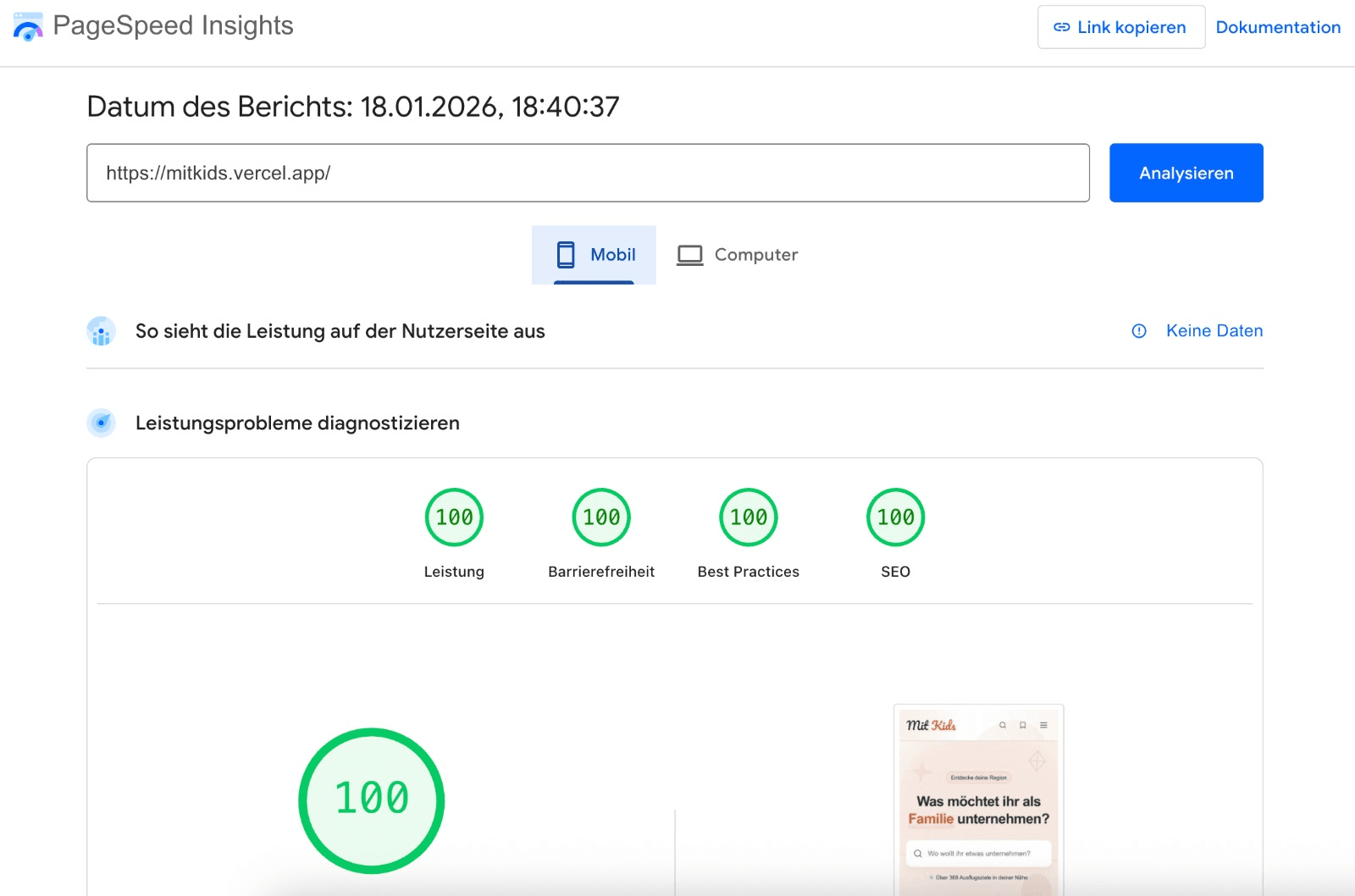
Several challenges had to be analyzed and solved to get there - challenges that would have cost me significantly more time without coding agents. For me, this is a clear sign that extreme speed in implementation and high quality in results do not have to be mutually exclusive.
New features for users
With the relaunch, several new features were introduced, all growing directly out of the clearer overall concept:
- a bookmark list for parents
- a completely rebuilt search with additional filters
- similar activities on detail pages
- multiple photos per activity
- the ability to submit new photos or opening hours
What stood out wasn’t any single feature. It was how seamlessly they fit into the overall picture - technically, conceptually, and visually. It was also great to see how my prompts for Codex improved through ChatGPT, and how fast feedback loops directly improved the outcome.
Better tools behind the scenes
A lot also changed internally:
- a much better admin interface
- clearer roles and permissions
- a login area for members
Things that aren’t visible to users. But crucial for keeping the platform maintainable in the long run.
What I take away from the project
AI didn’t replace me. It helped me use what I already know more effectively.
Familiar steps. Shorter iterations. Decisions became clear more quickly. Changes could be validated immediately. That noticeably changed my work - and, above all, made me want to take on more projects like this.
To me, it feels similar to working with really good teams: clear context, different perspectives, early feedback. AI made this way of working possible - not as a replacement, but as an amplifier.
Change has always been part of software development. Maybe it’s faster today. Maybe more visible.
But the most important part remains the same for me: staying curious, experimenting, and learning from what works - and what doesn’t.